Close Menu

    Subscribe to Updates

    Get the latest creative news from FooBar about art, design and business.

    What's Hot

    Ark Survival Evolved: How to Breed Dinos

    March 2, 2026

    How to Get Silk in Ark Survival Ascended: Quick Guide

    July 27, 2025

    Ubisoft Announces Claws of Awaji DLC and Major Updates for Assassin’s Creed Shadows

    July 27, 2025
    Facebook X (Twitter) Instagram LinkedIn
    Trending
    • Ark Survival Evolved: How to Breed Dinos
    • How to Get Silk in Ark Survival Ascended: Quick Guide
    • Ubisoft Announces Claws of Awaji DLC and Major Updates for Assassin’s Creed Shadows
    • How to Deal with Chargers in Helldivers 2: The Ultimate Post-Nerf Guide (2025)
    • How to Find Cheap Video Games Online in 2025
    • 7 Days to Die Storm’s Brewing V2.0 Experimental is Out Now
    • 7 Days to Die 2.0: New Release Date, New Features, and New Updates
    • Stellar Blade: Complete Edition Leaks Ahead of June 11 PC & PS5 Release
    Login
    Digital Game FeedDigital Game Feed
    • Home
    • Guides
    • Gaming News
    • PlayStation
    • Xbox
    Digital Game FeedDigital Game Feed
    Home » New Teleport System in Ark Astraeos
    ARK ASTRAEOS Guides New Release

    New Teleport System in Ark Astraeos

    Shahrukh SialBy Shahrukh SialMarch 1, 20254 Mins Read
    Facebook Twitter Pinterest
    ark astraeos teleport
    Share
    Facebook Twitter Pinterest Reddit Email

    In the latest update of Ark Astraeos, a new teleport system has been introduced to make fast travel between spawn areas on the map easier and more convenient. This feature enhances the gaming experience by saving players time and effort. Here’s a complete step by step guide on how to use it, information on how server owners can disable it, and some tips for console and single-player users.

    How to Teleport
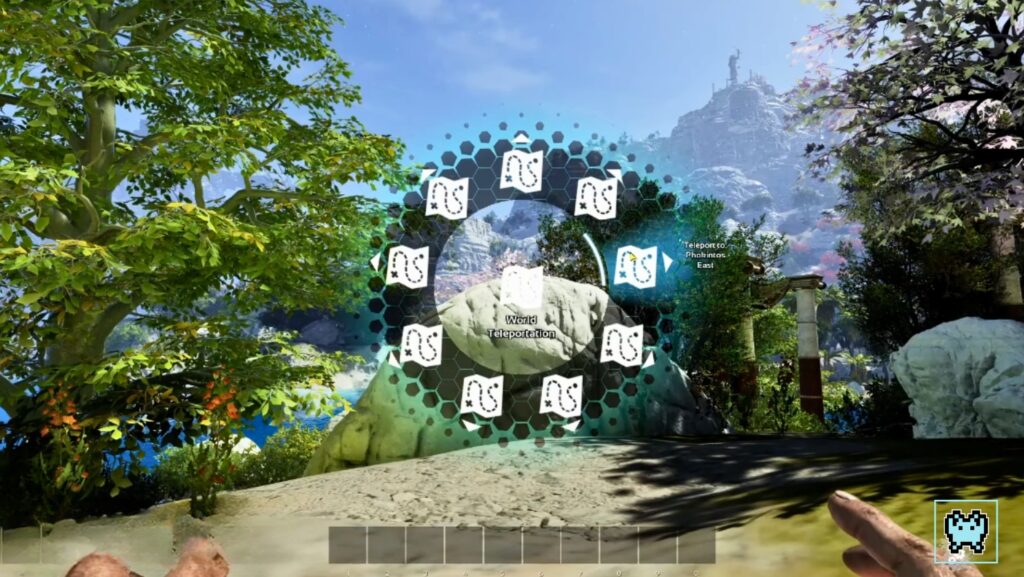
    world teleportation in ark astraeos

    PC Players:

    • Step 1: Press and hold down the R key.
    • Step 2: This action will open the radio menu.
    • Step 3: From the radio menu, select your desired destination.
    • Step 4: After a short moment, you will be teleported to the chosen location.

    Xbox Players:

    • Step 1: Hold down the X button.
    • Step 2: The radio menu will appear.
    • Step 3: Choose your destination from the menu.
    • Step 4: Wait a few moments, and you will be teleported to the selected location.

    PlayStation Players:

    • Step 1: Hold down the square button.
    • Step 2: The radio menu will open.
    • Step 3: Select the spawn area you want to teleport to.
    • Step 4: After a brief delay, you will be teleported to your chosen destination.

    Current Spawn Locations

    As of now, you can teleport to the following spawn locations:

    • Spawn Point 1: Located near the central hub, this spawn point is ideal for players who want to start their adventure in a bustling area.
    • Spawn Point 2: Situated in the northern region, this spawn point offers a more secluded environment, perfect for players who prefer a quieter start.
    • Spawn Point 3: Found in the southern part of the map, this spawn point is close to valuable resources and is ideal for players who want to gather materials quickly.
    • Spawn Point 4: Located in the eastern region, this spawn point is near a variety of biomes, making it a versatile starting point.
    • Spawn Point 5: Situated in the western part of the map, this spawn point is near unique structures and is great for players who enjoy exploring.

    How to Disable the Teleport Feature (Server Owners)

    ark astraeos teleport server setting

    If you are a server owner and want to disable the Teleport feature, follow these steps:

    Turn off the server

    Ensure that the server is completely turned off to avoid any data corruption or issues.

    Access the game’s UserSettings.ini file

    • Navigate to the directory where your Ark Astraeos server files are stored.
    • Locate the UserSettings.ini file.
    • This file is typically found in the ShooterGame/Saved/Config/WindowsServer/ directory.

    Add the following configuration

    • Open the UserSettings.ini file with a text editor.
    • Under the [ServerSettings] header, add the following line:
    • TraversalBuff=false
    • This configuration will disable the Teleport feature on your server.

    Save the changes

    • After adding the configuration, save the UserSettings.ini file.

    Turn the server back on

    • Restart your server to apply the changes.
    • Once the server is back up and running, the Teleport feature will be disabled.

    Console and Single-Player Users

    If you are playing on a console or in single-player mode, you will not be able to disable the Teleport feature as you don’t have access to the local game files. However, you can still enjoy the benefits of the Teleport system to enhance your gaming experience.

    Tips for Using the Teleport System

    Explore Different Spawn Points:

    Take the time to explore each spawn point to discover unique resources and environments. This can help you find the best starting location for your playstyle.

    Use Teleport for Quick Resource Gathering:

    If you need to gather specific resources quickly in Ark Astraeos, teleport to the spawn point nearest to those resources to save time.

    Avoid Teleporting During Combat:

    Teleporting during combat can be risky as you may reappear in a vulnerable position. Use the Teleport system during safe moments to avoid unnecessary risks.

    Coordinate with Teammates:

    If you are playing with friends, coordinate your teleportation to meet up at specific spawn points. This can help you work together more effectively.

    Experiment with Different Biomes:

    Ark Astraeos features a variety of biomes, each with its unique challenges and rewards. Use the Teleport system to explore different biomes and discover new creatures and resources.

    Conclusion

    The new Teleport system in Ark Astraeos is a significant addition that enhances the gaming experience by making fast travel more convenient. Whether you are a PC, Xbox, or PlayStation player, the process is straightforward to use. Server owners have the option to disable the feature if needed, and console and single-player users can still enjoy the benefits of the Teleport system.

    Thank you for reading. If you have any questions, need further assistance, or just want to share your thoughts, please leave a comment. If you found this guide helpful, please like and share it. Have a wonderful day.


    ARK Astraeos Console Single Player ARK Astraeos Server Settings ARK Astraeos Teleport System ARK Astraeos UserSettings.ini Digitalgamefeed Disable Teleport in ARK Astraeos Fast Travel in ARK Astraeos How to Teleport in ARK Astraeos Teleport in ARK Astraeos
    Share. Facebook Twitter Pinterest LinkedIn Tumblr Reddit Email
    Previous ArticleMonster Hunter Wilds: Release Date, Crossplay, Beta Details and More
    Next Article Get Ready for Waylay: The Fast and Furious New Agent in Valorant

    Related Posts

    How to Get Silk in Ark Survival Ascended: Quick Guide

    July 27, 2025

    How to Deal with Chargers in Helldivers 2: The Ultimate Post-Nerf Guide (2025)

    July 22, 2025

    How to Find Cheap Video Games Online in 2025

    June 21, 2025

    7 Days to Die 2.0: New Release Date, New Features, and New Updates

    May 17, 2025

    Stellar Blade: Complete Edition Leaks Ahead of June 11 PC & PS5 Release

    May 13, 2025

    Top 5 Maps in Call of Duty: Modern Warfare 3 (2025) – Ranked for Strategy & Action

    April 20, 2025
    Add A Comment
    Leave A Reply Cancel Reply

    Table of Contents
    1. How to Teleport
      1. PC Players:
      2. Xbox Players:
      3. PlayStation Players:
    2. Current Spawn Locations
    3. How to Disable the Teleport Feature (Server Owners)
      1. Turn off the server
      2. Access the game’s UserSettings.ini file
      3. Add the following configuration
      4. Save the changes
      5. Turn the server back on
    4. Console and Single-Player Users
    5. Tips for Using the Teleport System
      1. Explore Different Spawn Points:
      2. Use Teleport for Quick Resource Gathering:
      3. Avoid Teleporting During Combat:
      4. Coordinate with Teammates:
      5. Experiment with Different Biomes:
    6. Conclusion
    Editors Picks

    Ark Survival Evolved: How to Breed Dinos

    March 2, 2026

    How to Get Silk in Ark Survival Ascended: Quick Guide

    July 27, 2025

    Ubisoft Announces Claws of Awaji DLC and Major Updates for Assassin’s Creed Shadows

    July 27, 2025

    How to Deal with Chargers in Helldivers 2: The Ultimate Post-Nerf Guide (2025)

    July 22, 2025
    About Us
    About Us

    Welcome to Digital Game Feed! Stay updated with the latest gaming news, tips, and guides. Whether you're into survival or epic adventures, we've got you covered!

    Email Us: [email protected]

    Our Picks

    Ark Survival Evolved: How to Breed Dinos

    March 2, 2026

    How to Get Silk in Ark Survival Ascended: Quick Guide

    July 27, 2025

    Ubisoft Announces Claws of Awaji DLC and Major Updates for Assassin’s Creed Shadows

    July 27, 2025
    Top Reviews

    Tony Hawk’s Pro Skater 3 + 4 Remaster – Full Overview

    March 4, 2025

    Minecraft Movie (2025) Release Date, Cast, Trailer and Everything

    March 4, 2025

    Get Ready for Waylay: The Fast and Furious New Agent in Valorant

    March 2, 2025
    Facebook YouTube Reddit LinkedIn
    • Home
    • Guides
    • Gaming News
    • PlayStation
    • Xbox
    © 2026 Digital Game Feed.
    Developed by Alphanex Solutions

    Type above and press Enter to search. Press Esc to cancel.

    Sign In or Register

    Welcome Back!

    Login to your account below.

    Lost password?